
-
高速实时路况查询 -
免费领取 muse 30亿额度,把邀请链接发送给tg机器人即可免费领取muse30亿额度,无需任何操作,把邀请链接发送给tg机器人即可!
-
刹车大师,谁能最短时间刹停!不踩断刹车杆! -
拼音注音小助手拼音注音小助手
一键为中文文章添加拼音,生成教材式注音读物。
只需将文章粘贴进去,即可自动在汉字上方添加带声调的汉语拼音,并采用类似教材的上下排版方式。
非常适合幼儿园到小学低年级阶段使用。
-
以图搜图网站以图搜图网站
搜图bot: soutubot.moe
谷歌搜图: google.com/imghp
yandex搜图 yandex.ru/images/
trace搜图: trace.moe
SauceNAO: saucenao.com
ascii2d: ascii2d.net
iqdb识图: iqdb.org
tineye识图 tineye.com -
Codex 重置追踪Codex 重置追踪
Codex额度重置追踪网站,专门收集并记录Codex的额度重置公告。
支持查看完整历史记录、重置类型和具体公告,并提供英文、简体中文、繁体中文、日文、韩文界面。
-
Xiaomi MiMo-V2.6 系列正式发布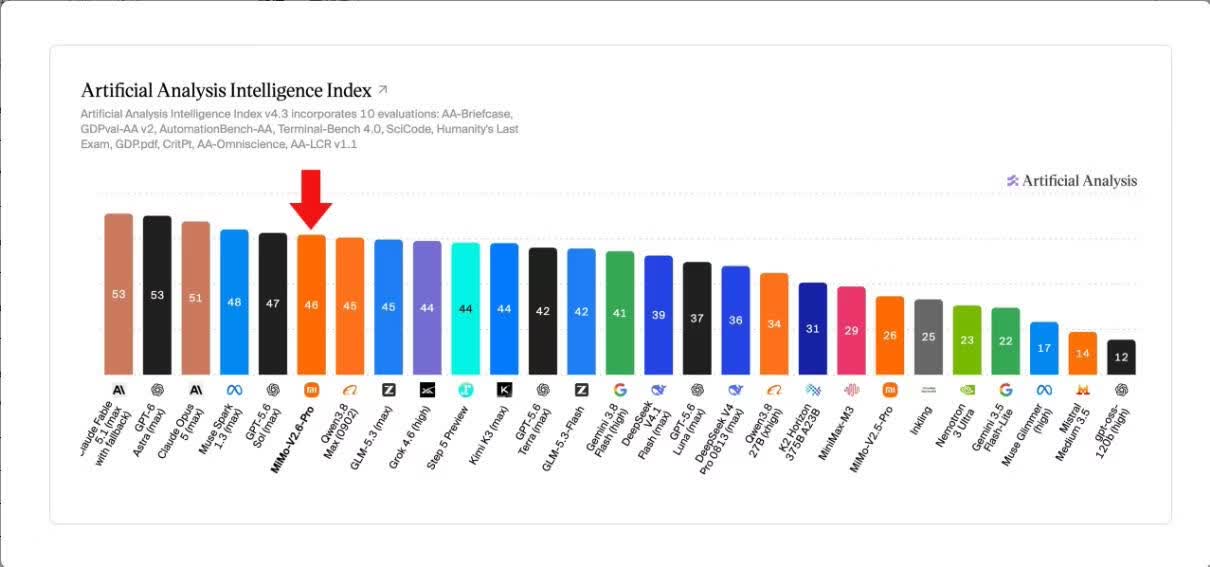
省流:遥遥领先其他国产模型!!
Xiaomi MiMo-V2.6 系列正式发布
这一次,我们带来三款模型,全系支持全模态理解,面向专业场景全面优化,兼顾性能、速度、成本的帕累托最优之选。
Xiaomi MiMo-V2.6 全系列模型:
·MiMo-V2.6-Pro:MiMo 迄今为止最强大的旗舰推理模型,全模态、超高性能、万亿参数的旗舰推理模型,覆盖复杂项目、长程任务、高价值工作、网络安全与科研需求。
·MiMo-V2.6-Flash:全模态、高智能、低成本的高效推理模型,面向专业办公中的高频调用与规模化任务的最佳均衡之选。
·MiMo-V2.6-Pro-Ultraspeed:兼顾 V2.6-Pro 旗舰性能,提供最高 20 倍输出速度,服务强实时交互与对响应速度敏感的生产场景。
更多更新同步上线:Xiaomi MiMo 批量推理(Batch API)上线:
支持 MiMo-V2.6-Flash、MiMo-V2.6-Pro 模型,为您的大批量、非实时推理需求提供更具性价比的解决方案。团队版 Token Plan 上新:
面向开发团队与企业的模型订阅服务。继承个人版全部权益,价格不变,团队管理更全面。让您的团队专注交付,成本清晰可控。模型介绍:https://mimo.mi.com/docs/news/latest/v2-6
Batch API :https://platform.xiaomimimo.com/console/batch
团队版 Token Plan:https://platform.xiaomimimo.com/token-plan?edition=TEAM -
字节面向公益机构提供福利 -
腾讯面向公益机构福利, WorkBuddy 积分申领说明 -
💪 天宫空间站实时追踪 -
Apple产品全球价格对比网站Apple产品全球价格对比网站
-
酷安跨平台桌面版酷安跨平台桌面版
第三方酷安桌面客户端,提供信息流、热榜、酷图、数码、动态、评论、点赞、收藏、转发、关注以及全站搜索等功能。
-
高性价比人生指南高性价比人生指南
覆盖长寿与防病、意外与急救、省钱与理财、防骗与法律红线、失业兜底、创业风险、做平台与合规、恋爱婚育、出国与技能。
498 条建议,每条写明花掉什么、换回什么、证据有多硬,来源只引期刊论文和官方文件。
-
高考真题大全高考真题大全
一个免费高考真题网站,面向师生提供海量带解析高考试卷
拥有 8369 份共 9GB 资源,覆盖 12 门科目、 64 年考题,可按年份、单科筛选新旧高考及各地自主命题试卷
-
暂停Windows更新教程暂停Windows更新教程
以管理员身份运行Windows PowerShell。执行以下代码,即可暂停更新到2030年1月1日,可修改命令中的日期,自定义暂停时间。
$path = "HKLM:\SOFTWARE\Microsoft\WindowsUpdate\UX\Settings" $end = (Get-Date "2030-01-01").ToUniversalTime().ToString("yyyy-MM-ddTHH:mm:ssZ") Set-ItemProperty -Path $path -Name "PauseUpdatesExpiryTime" -Value $end Set-ItemProperty -Path $path -Name "PauseFeatureUpdatesEndTime" -Value $end Set-ItemProperty -Path $path -Name "PauseQualityUpdatesEndTime" -Value $end -
Win11 25H2无法拖拽文件到任务栏软件打开?修改注册表一键恢复解决Win11不能直接拖拽文件到任务栏软件上打开的问题
最新更新了 Windows11 25H2 之后,不能拖动文件到务栏软件上打开,搜索了一些教程,亲测修改注册表可以解决。
新建一个文件,例如:
Win11任务栏拖拽修复.reg将以下内容复制进去:
Windows Registry Editor Version 5.00

[HKEY_LOCAL_MACHINE\SOFTWARE\Microsoft\Windows\CurrentVersion\Policies\System]
"EnableLUA"=dword:00000001
"FilterAdministratorToken"=dword:00000001

[HKEY_LOCAL_MACHINE\SOFTWARE\Microsoft\Windows\CurrentVersion\Policies\Explorer]
"NoDragDropToTaskbar"=dword:00000000

[HKEY_CURRENT_USER\Software\Microsoft\Windows\CurrentVersion\Explorer\Advanced]
"EnableDragDrop"=dword:00000001
"TaskbarDragDropEnabled"=dword:00000001
保存后:
右键 Win11任务栏拖拽修复.reg
选择 合并
点击 是
重启电脑即可 -
ClawEmail 邀请码 -
皮影数字博物馆皮影数字博物馆
皮影数字博物馆是中国美术学院的公益数字资源平台,它系统展示4.8万件皮影雕刻作品、1366册影卷、表演唱腔等珍贵资源,提供图文影音动画形式。
-
台风路径发布系统 -
在线追番网站

 天宫空间站实时追踪